wpml-plugin-issue

Fixing WPML Plugin Error After Updating to WordPress 6.1

❗ The Problem

After updating to WordPress 6.1, your site throws a fatal error:

Fatal error: Uncaught Error: Call to undefined method WP_Textdomain_Registry::reset()
in LanguageSwitch.php on line 139

This happens only on sites using WPML, and deactivating the WPML plugins brings the site back—though that’s only a temporary solution.

✅ The Cause

WordPress 6.1 introduced breaking changes that require updated versions of WPML and its add-ons. Older versions are incompatible and throw errors, as seen above.

WPML’s Statement:

WPML Multilingual CMS 4.5.12 and WPML String Translation 3.2.3 are required for compatibility with WordPress 6.1.
View official changelog →


🛠️ Permanent Fix: Update WPML Plugins

Follow these steps:

  1. Backup your website (just to be safe).

  2. Download the latest WPML plugins from your account:
    https://wpml.org/account/downloads/

  3. Manually update via FTP or File Manager:

    • Deactivate current WPML plugins.

    • Delete the plugin files (not the database).

    • Upload the latest plugin versions.

    • Reactivate them.

📄 Full instructions: Updating WPML Manually

You won’t lose any translation data—WPML stores them in the database.

🩹 Quick Fix: Temporary Workaround (Not Recommended Long-Term)

If you can’t update WPML right away, use this quick patch:

Go to:

/wp-content/plugins/wpml-string-translation/classes/MO/Hooks/LanguageSwitch.php

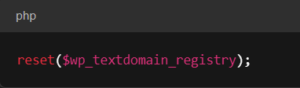
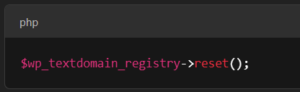
On line 139, change this:

$wp_textdomain_registry->reset();
wpml

To:

reset($wp_textdomain_registry);

wpml

💡 This bypasses the missing method error—but it’s not future-proof. Always plan to upgrade.

✅ Final Thoughts

WordPress core updates can introduce breaking changes—especially when working with plugins as deep as WPML. Staying on top of plugin versions ensures smooth performance and fewer surprises.

Leave a Reply

Your email address will not be published. Required fields are marked *